An analysis of the question has been provided below.
Correct Answer: D
(Assuming the options are similar to the following, based on standard cloud practices)
A. Delete the VM instance from the Compute Engine page.
B. Stop the VM instance from the Compute-Engine page.
C. Delete the entire Google Cloud project.
D. Delete the deployment from the Deployment Manager page.
Explanation
The most efficient method to decommission a FortiWeb instance and all its dependent resources on Google Cloud is to delete the entire deployment from the Google Cloud Deployment Manager. Fortinet provides Deployment Manager templates for deploying FortiWeb, which bundle the VM instance, VPC networks, subnets, firewall rules, and public IPs into a single manageable unit called a "deployment". Deleting this parent deployment object ensures that Google Cloud automatically and atomically removes all the associated child resources, preventing orphaned components and ensuring a complete and clean removal with a single action.
Why Incorrect Options are Wrong
A. Delete the VM instance from the Compute Engine page. This action is incomplete. It only removes the virtual machine, leaving behind associated resources like persistent disks, firewall rules, and network configurations, which require separate manual deletion.
B. Stop the VM instance from the Compute-Engine page. This only halts the running instance. All resources remain provisioned and continue to incur costs. It does not decommission or delete any components.
C. Delete the entire Google Cloud project. This is an excessive and destructive action. It would delete all resources within the project, not just the specific FortiWeb deployment, potentially impacting other unrelated services.
References
1. Google Cloud Documentation - Deployment Manager: "When you delete a deployment, you also delete all of the resources that were created for that deployment. This action is permanent." Source: Google Cloud, "Deployment Manager Documentation > Deleting a deployment".
Reference: https://cloud.google.com/deployment-manager/docs/deployments/deleting-deployments (Accessed under the section "Deleting a deployment").
2. Fortinet Document Library - FortiWeb Deployment on GCP: The official deployment guide specifies using the Google Cloud Deployment Manager template for installation. This establishes that the entire stack of resources is managed as a single "deployment". Therefore, the reverse process (deletion) should also be managed at the deployment level for efficiency and completeness. Source: Fortinet, "FortiWeb-VM on the Google Cloud Platform Cookbook".
Reference: In the section "Deploying FortiWeb-VM", the document states, "FortiWeb-VM for Google Cloud provides a Cloud Deployment Manager template that you can use to quickly and easily deploy a FortiWeb-VM." This confirms the standard deployment methodology.

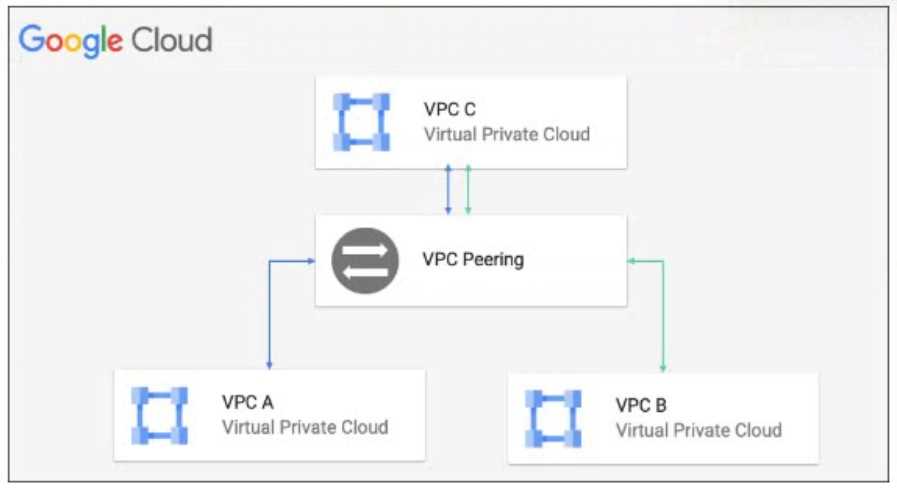 Which action must the administrator take to route traffic from VPC B to VPC A?
 Which three things happen during a failover in which the passive FortiGate VM becomes the master cluster member in an active-passive high-availability (HA) environment? (Choose three.)
 Which two types of traffic flow must the FortiGate cluster inspect, if the client at 198.51.100.10 sends traffic to the Workload A instance? (Choose two.)