
IBM certification practice
C1000-101 Practice Questions
Try 10 free C1000-101 exam-style questions for IBM Cloud Professional Sales Engineer v1. Check each answer and review the explanation and source references.
- Exam code
- C1000-101
- Provider
- IBM
- Free questions
- 10
- Full set
- 63 questions
- Last update check
If you want to excel as an IBM Cloud Professional Sales Engineer v1, utilizing an interactive practice test software is one of the smartest ways to prepare for the C1000-101 exam. Cert Mage offers a comprehensive C1000-101 practice quiz completely free of charge, allowing everyone to access high-quality PDF questions that perfectly simulate the actual exam experience. After attempting the questions, you will benefit from clear, detailed answer explanations that break down IBM cloud services, pricing structures, and compliance standards. This free study aid will undoubtedly assist you in identifying your weak spots, and you can always secure premium access for extra help and a huge number of supplementary IBM C1000-101 exam questions.
IBM Cloud Monitoring with Sysdig is the service specifically designed to provide deep operational visibility into the performance and health of applications, services, and platforms. It delivers full-stack telemetry, allowing administrators and DevOps teams to monitor infrastructure, services, and applications in real-time. The service includes features for creating custom dashboards, defining alerts on metrics, and troubleshooting performance issues. It is the native, fully integrated monitoring solution offered within the IBM Cloud Catalog for this purpose.
A. Splunk: Splunk is a third-party service available in the catalog, primarily focused on log data analysis, security information, and event management (SIEM), not native real-time performance and health monitoring.
C. LogDNA: This powers the IBM Cloud Log Analysis service, which is designed for aggregating, searching, and analyzing log data, rather than monitoring performance metrics and overall system health.
D. New Relic: While New Relic is a powerful Application Performance Monitoring (APM) tool available in the IBM Cloud Catalog, the native and deeply integrated IBM Cloud Monitoring service is based on Sysdig technology.
1. IBM Cloud Documentation, "About IBM Cloud Monitoring": "IBM Cloud® Monitoring provides operational visibility into the performance and health of your applications, services, and platforms. It offers administrators, DevOps teams, and developers full stack telemetry with advanced features to monitor and troubleshoot, define alerts, and design custom dashboards... The IBM Cloud Monitoring service is based on the Sysdig platform." (Source: IBM Cloud Docs, retrieved from https://cloud.ibm.com/docs/monitoring?topic=monitoring-getting-started)
2. IBM Cloud Documentation, "About IBM Cloud Log Analysis": "Use IBM Cloud® Log Analysis to add log management capabilities to your IBM Cloud architecture... You can use this service to view, monitor, and manage logs..." This documentation clearly defines its role as log management, distinct from performance monitoring. (Source: IBM Cloud Docs, retrieved from https://cloud.ibm.com/docs/log-analysis?topic=log-analysis-getting-started)
3. IBM Cloud Blog, "IBM Cloud Monitoring with Sysdig Is Now Generally Available": This official announcement details the partnership and integration, stating, "IBM Cloud Monitoring with Sysdig gives you operational visibility into the performance and health of your applications, services, and platforms." (Source: IBM Cloud Blog, "IBM Cloud Monitoring with Sysdig Is Now Generally Available," June 26, 2019)
Question breakdown
- Tests
- Identify IBM Cloud observability services
- Difficulty
- Easy
Key idea: IBM Cloud Monitoring is built on Sysdig and supplies metrics-based, full-stack visibility into the health and performance of apps, services, and platforms.
How to reach the answer
- The phrase 'operational visibility into the performance and health' points to a metrics and monitoring service, not log management.
- IBM Cloud's native monitoring add-on in the catalog is IBM Cloud Monitoring with Sysdig.
- LogDNA backs Log Analysis, which is a logging service, so it does not fit.
- Splunk and New Relic are third-party tools, not the integrated catalog monitoring service the question describes.
Each option
- AIncorrect. Splunk is a third-party log analytics and SIEM tool, not IBM Cloud's native performance and health monitoring add-on.
- BCorrect. Sysdig powers IBM Cloud Monitoring, which delivers metrics, dashboards, and alerts for the health and performance of apps, services, and platforms.
- CIncorrect. LogDNA powered IBM Cloud Log Analysis, which aggregates and searches logs rather than monitoring performance metrics.
- DIncorrect. New Relic is an APM vendor, not the integrated IBM Cloud Monitoring service.
Common trap: LogDNA was paired with Sysdig in IBM Cloud's observability set, so candidates mix up logging with monitoring.
In practice: When a client asks how to watch cluster and app health on IBM Cloud, you propose IBM Cloud Monitoring (Sysdig) for metrics and alerts, and a separate logging service for logs.
Remember: Use Sysdig for metrics and health monitoring and LogDNA for logs on IBM Cloud.
Official documentation: Getting started with IBM Cloud Monitoring
Drafted with AI assistance and checked against the answer key.
IBM Cloud adopts a shared-responsibility model: IBM secures the cloud infrastructure itself, while each customer is accountable for anything they deploy or configure inside that infrastructure (operating systems, applications, data, network controls). Because the question focuses specifically on “security of a clients’ environments in the IBM Cloud” (that is, the resources that the customer owns and manages inside the cloud), the responsibility rests with the client. IBM’s obligation ends at the underlying physical facilities, hardware, and managed platform services.
A. The OS vendor supplies patches but does not operate or secure the customer’s deployed environment in IBM Cloud.
B. IBM secures the cloud infrastructure, not the customer’s own workloads, data, and configurations.
D. While overall cloud security is shared, the portion concerning the customer’s own environment is solely the client’s duty, not jointly managed.
1. IBM Cloud Docs – “Security and compliance overview: Shared responsibility model,” Section “Security in IBM Cloud” (docs/overview?topic=overview-security).
2. IBM Cloud Virtual Servers Documentation – “Customer responsibilities,” para. 1 & 2 (docs/vsi?topic=virtual-servers-security).
3. IBM Cloud Security White Paper v3, §3.2 “Customer workload responsibilities,” pp. 9–10.
4. NIST SP 800-144 “Guidelines on Security and Privacy in Public Cloud Computing,” §3.1 (supports provider vs. tenant delineation).
IBM Cloud Schematics is the dedicated Infrastructure as Code (IaC) service designed to automate the provisioning and management of IBM Cloud resources. It uses open-source tools, primarily Terraform, to allow users to define their cloud infrastructure in declarative configuration files. By running these files, Schematics can create, update, and manage cloud environments in a consistent, repeatable, and automated fashion. This service directly addresses the need to automate the deployment of resources like VPCs, virtual servers, and Kubernetes clusters.
A. Functions: IBM Cloud Functions is a serverless, event-driven compute platform (FaaS). Its purpose is to run code in response to triggers, not to provision infrastructure.
B. Coligo: This is not a native IBM Cloud service for automating the provisioning of cloud resources.
C. Skytap: Skytap on IBM Cloud is a specialized Infrastructure as a Service (IaaS) offering designed to migrate and run traditional, complex enterprise applications, not for general-purpose resource provisioning automation.
1. IBM Cloud Documentation - About IBM Cloud Schematics: "IBM Cloud® Schematics delivers powerful tools to automate your IBM Cloud infrastructure provisioning and management process... Schematics uses Terraform as the infrastructure-as-code engine." (Source: IBM Cloud Docs, "Getting started with Schematics", Introduction section).
2. IBM Cloud Documentation - About IBM Cloud Functions: "IBM Cloud® Functions is a Function-as-a-Service (FaaS) platform... It's a polyglot, event-driven compute platform that runs application logic in response to events or direct invocations..." (Source: IBM Cloud Docs, "About IBM Cloud Functions", Overview section).
3. IBM Cloud Documentation - About Skytap on IBM Cloud: "Skytap on IBM Cloud is an infrastructure-as-a-service (IaaS) offering that is built to run traditional enterprise applications on IBM Cloud." (Source: IBM Cloud Docs, "Getting started with Skytap on IBM Cloud", Introduction section).
Question breakdown
- Tests
- Select IBM Cloud automation and Infrastructure as Code services
- Difficulty
- Easy
Key idea: IBM Cloud Schematics is the managed Terraform-based Infrastructure as Code service for provisioning and managing IBM Cloud resources.
How to reach the answer
- The clue 'automate the provisioning of IBM Cloud resources' describes Infrastructure as Code.
- Schematics runs Terraform (and Ansible) workspaces to create and update resources.
- Functions runs event-driven code and does not provision infrastructure.
- Coligo, which became Code Engine, runs workloads, and Skytap hosts traditional workloads; neither is a provisioning tool.
Each option
- AIncorrect. Cloud Functions is a FaaS runtime for event-triggered code, not a resource-provisioning service.
- BIncorrect. Coligo was the early name of Code Engine, a serverless platform for running containers and code, not for automating infrastructure provisioning.
- CIncorrect. Skytap on IBM Cloud runs traditional workloads such as IBM i and AIX; it does not automate IBM Cloud provisioning.
- DCorrect. Schematics uses Terraform templates to automate provisioning and lifecycle management of IBM Cloud resources.
Common trap: Functions sounds like automation because it can script actions, but it executes code rather than declaring infrastructure.
In practice: Teams store Terraform templates in Git and use Schematics workspaces to stand up repeatable VPC, cluster, and database environments.
Remember: For automated, repeatable provisioning on IBM Cloud, think Schematics (Terraform as a service).
Official documentation: Getting started with IBM Cloud Schematics
Drafted with AI assistance and checked against the answer key.
In IBM Cloud VPC, a user can place a virtual-server instance in the Stopped state. When the instance is stopped, “paused billing” is automatically applied: charges for vCPUs and RAM cease, while the boot volume and any reserved public IP continue to incur minimal cost. Restarting the instance is much faster than deleting and recreating it, so paused billing offers an efficient, on-demand way to scale infrastructure up or down without incurring full runtime charges.
A. Reserved billing Provides discounted pricing for long-term, continuously-running instances; does not help rapid up/down scaling.
B. Minimum billing No such billing model exists for IBM Cloud VPC instances.
C. Suspend billing Term used in some Classic infrastructure services, not supported for VPC virtual servers.
1. IBM Cloud Docs – Virtual Private Cloud, “Stopping and starting a virtual server instance” → paragraph “Paused billing begins when the instance is stopped; vCPU and RAM charges halt.” (docs/vpc?topic=vpc-managing-instances#stop-start)
2. IBM Cloud Docs – “Pricing details for Virtual Server for VPC” → section “Paused billing (stopped instances)” (docs/vpc?topic=vpc-instance-pricing#paused-billing)
3. IBM Cloud Docs – “Best practices for cost optimization in VPC” → subsection “Use paused billing instead of deleting and recreating instances.” (docs/vpc?topic=vpc-cost-best-practices#paused)
IBM Cloud Pak for Applications is the solution specifically designed to help organizations modernize existing applications and build new cloud-native applications. It provides an integrated set of tools and runtimes, including Red Hat OpenShift, which enables a consistent development and deployment experience across any public, private, or hybrid cloud. This container-based platform directly addresses the customer's need to adopt cloud-native practices for both new and existing applications while avoiding dependency on a single cloud provider, thus preventing lock-in.
A. IBM Cloud Pak for Data: This solution is an integrated data and AI platform. Its primary purpose is to collect, organize, and analyze data, not general-purpose application development and modernization.
C. IBM Cloud Pak for Security: This solution is focused on providing security insights and threat management. It connects disparate security tools and data sources, but it is not a platform for application development.
D. IBM Cloud Pak for Automation: This solution is designed to automate business processes and workflows. While it has development components, they are specific to automation tasks, not general cloud-native application development.
1. IBM Cloud Pak for Applications Documentation: "IBM Cloud Pak for Applications is an enterprise-ready, containerized software solution for modernizing existing applications and developing new cloud-native apps that run on Red Hat OpenShift." This statement directly aligns with the customer's requirement.
Source: IBM Documentation, "IBM Cloud Pak for Applications," Welcome to IBM Cloud Pak for Applications. (Accessed for version 5.2).
2. IBM Cloud Paks Overview: The official product page describes its purpose: "Accelerate the creation of cloud-native applications by leveraging built-in developer tools and processes... Build applications on any cloud, for deployment on any cloud." This confirms its role in preventing cloud provider lock-in.
Source: IBM Official Product Page, "IBM Cloud Pak for Applications," Overview section.
3. Contrasting IBM Cloud Paks: Official documentation differentiates the Paks by function. IBM Cloud Pak for Data is for "AI Ladder," Cloud Pak for Automation is for "business automation," and Cloud Pak for Security is for "security operations." This clarifies that only Cloud Pak for Applications is centered on general application modernization and development.
Source: IBM Documentation, "IBM Cloud Paks," What are IBM Cloud Paks? section.
Question breakdown
- Tests
- Map IBM Cloud Paks to client needs
- Difficulty
- Easy
Key idea: Cloud Pak for Applications provides OpenShift-based runtimes and tools to build new cloud-native apps and modernize existing ones on any cloud.
How to reach the answer
- The clues are 'cloud-native design and development', 'new and existing applications', and 'no lock-in'.
- Application modernization plus new development is the stated purpose of Cloud Pak for Applications.
- It runs on Red Hat OpenShift, so it is portable across public, private, and hybrid clouds.
- The Data, Security, and Automation Paks address analytics/AI, SecOps, and business process needs.
Each option
- AIncorrect. Cloud Pak for Data targets data collection, governance, and AI, not general application development.
- BCorrect. Cloud Pak for Applications supports building and modernizing apps on OpenShift, which avoids provider lock-in.
- CIncorrect. Cloud Pak for Security unifies threat detection and response tooling, not app development.
- DIncorrect. Cloud Pak for Automation focuses on workflow, decisions, and content automation, not general cloud-native development.
Common trap: Every Cloud Pak runs on OpenShift and is therefore portable, so 'no lock-in' alone does not identify the answer; the application-development focus does.
In practice: For a client modernizing WebSphere apps while starting microservices projects, Cloud Pak for Applications (now largely folded into WebSphere Hybrid Edition) was the standard proposal.
Remember: For app modernization and cloud-native development on any cloud, choose Cloud Pak for Applications.
Drafted with AI assistance and checked against the answer key.
A "Cloud Enabled" application is an existing application, originally designed for an on-premise environment, that has been modified or reconfigured to run on a cloud infrastructure. This process often involves minimal code changes, focusing on making the application compatible with the cloud platform. This term is distinct from "Cloud Native," which refers to applications built from the ground up specifically to leverage cloud architectures and services. The key distinction is the application's origin and migration path—it was enabled for the cloud, not born in it.
A. Cloud Aware: This term describes an application that can recognize and interact with cloud services, but it does not specify the application's origin or migration pattern.
B. Cloud Based: This is a very general term for any application that runs on a cloud infrastructure. It is not specific enough, as it includes both cloud-enabled and cloud-native applications.
C. Cloud Native: This refers to applications designed and built specifically for cloud platforms, using architectures like microservices and containers, which is the opposite of a modified on-premise application.
1. IBM Cloud Learn Hub, "Cloud Native vs. Cloud Enabled": This official IBM resource explicitly defines the terms. It states, "Cloud-enabled applications are applications that were originally created to run in a traditional on-premises data center but were later modified to run on a cloud infrastructure." This directly supports the correct answer. (IBM Cloud Education, Cloud Native vs. Cloud Enabled, retrieved from ibm.com/cloud/learn/cloud-native-vs-cloud-enabled).
2. IBM Redbooks, "IBM Cloud Pak for Applications: A Primer" (SG24-8474-00): Section 1.2, "Application modernization," discusses the journey of modernizing traditional applications. It describes moving existing applications to the cloud, a process that results in them being "cloud-enabled" as a step towards potentially becoming fully cloud-native. This source distinguishes the modification of existing apps from building new ones.
3. IBM Cloud Blog, "Cloud-Native vs. Cloud-Enabled vs. Cloud-Based: What’s the Difference?": This article clarifies the terminology, defining Cloud-Enabled as "legacy, on-premises applications that have been moved to the cloud with little-to-no refactoring." It further explains that "Cloud-Based" is a generic umbrella term, making "Cloud-Enabled" the more precise answer for the scenario described. (Published on the official IBM Cloud Blog).
Question breakdown
- Tests
- Distinguish cloud application terminology
- Difficulty
- Easy
Key idea: A cloud-enabled application began life on-premises and was later adapted to run on cloud infrastructure, unlike a cloud-native app, which is designed for the cloud from the start.
How to reach the answer
- The decisive clue is that the application was on-premise first and then modified.
- Cloud native describes apps designed for the cloud from inception, so origin rules it out.
- Cloud based is a broad label for anything hosted in the cloud and says nothing about where the app came from.
- Cloud aware describes an app's ability to use cloud services, not its migration history.
- Cloud enabled is the term for an existing app adapted to cloud, so D is the answer.
Each option
- AIncorrect. Cloud aware refers to an app's ability to detect and use cloud capabilities, not to an on-premise app that was adapted.
- BIncorrect. Cloud based is a generic term for any cloud-hosted app and does not convey an on-premise origin.
- CIncorrect. Cloud native apps are built for the cloud from day one, typically with microservices and containers, which is the opposite of a modified legacy app.
- DCorrect. Cloud enabled specifically describes an existing on-premise application reworked to run on cloud infrastructure.
Common trap: Cloud native is tempting because it is the most familiar cloud buzzword, but it implies the app was designed for the cloud rather than migrated there.
In practice: In modernization discussions, sales engineers explain that lift-and-shift or lightly refactored workloads become cloud enabled. Becoming cloud native usually requires deeper refactoring.
Remember: Migrated from on-premise means cloud enabled; designed for the cloud means cloud native.
Drafted with AI assistance and checked against the answer key.
The client's request has two specific requirements: the service must be HIPAA compliant, and it must be a NoSQL document database. IBM Cloud Databases for MongoDB is a fully managed, document-oriented NoSQL database service. According to official IBM Cloud documentation, Databases for MongoDB is a HIPAA-ready service, meaning it can be configured to meet the technical controls and requirements for handling Protected Health Information (PHI). This service directly satisfies both of the client's stated needs, making it the correct choice.
B. Databases for Elasticsearch: While it is a HIPAA-ready NoSQL service, Elasticsearch is primarily a specialized search and analytics engine, not a general-purpose document database as requested.
C. Databases for PostgreSQL: This is an object-relational database system (SQL-based), not a NoSQL document database, and therefore does not meet a core requirement.
D. IBM Db2: This is a relational database management system (RDBMS) that uses SQL. It does not fulfill the requirement for a NoSQL database.
1. IBM Cloud Documentation, "Services enabled for HIPAA": This document lists the IBM Cloud services that are HIPAA-ready. It explicitly includes "Databases for MongoDB," "Databases for Elasticsearch," "Databases for PostgreSQL," and "Db2 on Cloud" in the list of Platform services. This confirms the HIPAA compliance aspect for all options.
Source: IBM Cloud Docs, Compliance, "Services enabled for HIPAA".
2. IBM Cloud Documentation, "About IBM Cloud Databases for MongoDB": This official documentation describes the service as follows: "IBM Cloud® Databases for MongoDB is a document-oriented database service that stores data in a JSON-like, BSON format." This confirms it is a NoSQL document database.
Source: IBM Cloud Docs, Databases for MongoDB, "Getting started with IBM Cloud Databases for MongoDB".
3. IBM Cloud Documentation, "About IBM Cloud Databases for PostgreSQL": This page states, "IBM Cloud® Databases for PostgreSQL is a fully managed service for the popular open-source object-relational database." This confirms it is a relational (SQL) database.
Source: IBM Cloud Docs, Databases for PostgreSQL, "About IBM Cloud Databases for PostgreSQL".
4. IBM Cloud Documentation, "Db2 on Cloud": The product page describes the service as a "fully managed SQL cloud database," confirming it is a relational database and not NoSQL.
Source: IBM Cloud Docs, Db2 on Cloud, "About Db2 on Cloud".
Question breakdown
- Tests
- Match database services to data model and compliance needs
- Difficulty
- Easy
Key idea: Databases for MongoDB is IBM Cloud's managed NoSQL document database, and it is enabled for HIPAA workloads.
How to reach the answer
- There are two requirements: HIPAA support and a NoSQL document database.
- Several IBM Cloud Databases services support HIPAA, so compliance alone does not separate the options.
- The data model decides it: PostgreSQL and Db2 are relational SQL databases.
- Elasticsearch is a search and analytics engine, not a general-purpose document store.
- MongoDB is the document-oriented NoSQL service, so A is the answer.
Each option
- ACorrect. Databases for MongoDB is a managed document-oriented NoSQL service that can be used for HIPAA workloads.
- BIncorrect. Elasticsearch stores JSON but is positioned as a search and analytics engine, not the primary document database.
- CIncorrect. PostgreSQL is an object-relational SQL database, so it fails the NoSQL requirement.
- DIncorrect. Db2 is a relational database management system, not a NoSQL document store.
Common trap: Elasticsearch is tempting because it stores JSON documents and is NoSQL, but IBM positions it for search and indexing rather than as a document database.
In practice: Healthcare clients often need a flexible schema for patient or claims data under HIPAA. The sales engineer must confirm both compliance support and data-model fit, and note that the client also needs a BAA with IBM.
Remember: When compliance support is shared across options, choose by data model: document NoSQL on IBM Cloud means Databases for MongoDB.
Official documentation: IBM Cloud Databases for MongoDB documentation
Drafted with AI assistance and checked against the answer key.
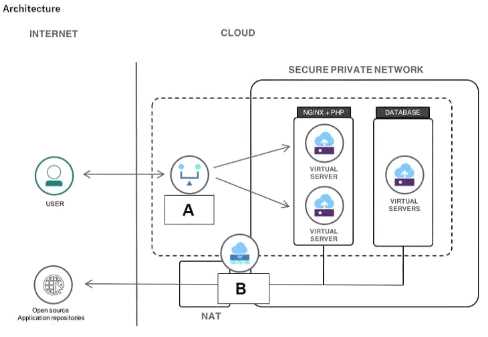 Which component is represented by the A in the image of the web application architecture?
The component labeled "A" in the diagram is represented by a brick wall symbol, which is the standard and universally recognized icon for a firewall in network and system architecture diagrams. Its strategic placement at the edge of the network, intercepting all incoming traffic from users before it reaches the load balancer and internal web servers, confirms its role. A firewall acts as a security barrier, inspecting and filtering traffic based on a defined set of rules to protect the application from unauthorized access and malicious threats.
A. load balancer: The load balancer is explicitly labeled as a separate component in the architecture that receives traffic after it has passed through component A.
C. container: A container is a software package that includes an application and its dependencies. It is a deployment unit, not a network security device.
D. cluster: A cluster is a group of servers working together (e.g., the web servers). Component A is depicted as a single, distinct network device.
1. IBM Cloud Docs: In the "What is a firewall?" article, IBM defines a firewall as "a network security device that monitors incoming and outgoing network traffic and decides whether to allow or block specific traffic based on a defined set of security rules." This function perfectly matches the role of component A in the diagram. (Source: IBM Cloud Documentation, "What is a firewall?", retrieved from the official IBM website).
2. University Courseware: Standard computer networking textbooks used in university curricula, such as "Computer Networking: A Top-Down Approach," consistently use the brick wall symbol to represent a firewall that separates a trusted internal network from the untrusted public Internet. (Source: Kurose, J. F., & Ross, K. W. (2021). Computer Networking: A Top-Down Approach (8th ed.). Pearson. Chapter 8, Section 8.2 "Firewalls").
3. IBM Redbooks: The IBM Redbooks publication "IBM Cloud Private Application Developer's Guide" discusses the layered security model for cloud applications. It emphasizes the role of firewalls and network policies as a fundamental security component for controlling traffic flow into the cluster. (Source: IBM Redbooks, SG24-8441-00, IBM Cloud Private Application Developer's Guide, Section 2.3 "Security").
To effectively follow IBM Cloud Tutorials, a user needs tools to interact with the cloud platform and to obtain the necessary source code. The IBM Cloud Command Line Interface (CLI) is the primary tool for managing IBM Cloud resources, services, and applications from a terminal, a fundamental task in most tutorials. Git is the de facto standard for version control and is essential for cloning the starter application code and assets provided in repositories (like GitHub) for nearly all hands-on tutorials.
A. VMware is a specific virtualization solution available on IBM Cloud, not a general-purpose tool required to start with most tutorials.
B. Red Hat OpenShift is a specific container platform service on IBM Cloud; many tutorials do not involve OpenShift and use other services instead.
E. A Virtual Private Cloud (VPC) is a networking resource created within IBM Cloud, not a client-side tool a user must have to begin a tutorial.
1. IBM Cloud Documentation, "Setting up the CLI and developer tools": This official guide explicitly states, "To get started with developing apps in IBM Cloud, set up your command-line interface (CLI)..." It then provides installation instructions for the ibmcloud CLI as the foundational step. The same section often guides users on logging in via the CLI to begin work.
Source: IBM Cloud Docs, "Setting up the CLI and developer tools". (A search for this title on the official IBM Cloud documentation website will lead to the relevant page).
2. IBM Cloud Solution Tutorials: The "Before you begin" section of virtually all solution tutorials lists the required tools. For example, the "Deploy a scalable web application on Kubernetes" tutorial explicitly lists "IBM Cloud CLI" and "Git" as prerequisites. This pattern is consistent across tutorials for different services.
Source: IBM Cloud Docs, Solution Tutorial: "Deploy a scalable web application on Kubernetes", Section: "Before you begin".
3. IBM Cloud Documentation, "Getting started with IBM Cloud": The introductory guides for developers consistently direct them to two initial actions: creating an account and setting up their local environment, which includes installing the IBM Cloud CLI to interact with the platform and using Git to access code.
Source: IBM Cloud Docs, "Getting started" section. (The general "Getting started" path for developers highlights CLI setup).
Question breakdown
- Tests
- Identify prerequisite developer tooling for IBM Cloud
- Difficulty
- Easy
Key idea: IBM Cloud solution tutorials expect the IBM Cloud CLI for managing resources and Git for retrieving sample code.
How to reach the answer
- The clue is 'must-have tools' a client installs to work through tutorials.
- Tools are client-side utilities, which rules out cloud services and resources such as VPC, OpenShift and VMware.
- The IBM Cloud CLI is how tutorials provision and manage resources from the terminal.
- Git is needed to clone the sample repositories that tutorials reference.
- Therefore C and D are the answers.
Each option
- AIncorrect. VMware is a specific platform offering on IBM Cloud, not a general prerequisite tool.
- BIncorrect. Red Hat OpenShift is a service used only in some tutorials, not a universal client tool.
- CCorrect. The IBM Cloud CLI is the core command-line tool that tutorials use to log in and manage resources.
- DCorrect. Git is required to clone the tutorial code repositories.
- EIncorrect. VPC is an infrastructure resource you create in IBM Cloud, not a tool you install.
Common trap: OpenShift feels essential because it appears in so many IBM materials, but it is a platform service, not a prerequisite tool.
In practice: When onboarding a client team for a proof of concept, sales engineers have developers install the IBM Cloud CLI and Git first. This keeps hands-on sessions from stalling.
Remember: The baseline IBM Cloud developer toolkit is the IBM Cloud CLI plus Git.
Official documentation: Getting started with the IBM Cloud CLI
Drafted with AI assistance and checked against the answer key.
The modernization roadmap is a key deliverable created during the Advise theme of the IBM Garage Method. This initial phase focuses on strategic activities, including assessing the current application portfolio, defining the target state architecture, building a compelling business case, and creating a detailed, prioritized roadmap for the transformation journey. This roadmap guides all subsequent activities in the Build, Move, and Manage phases. The Advise theme ensures that the modernization effort is aligned with business objectives before any development work begins.
A. Reason stage at Practices: "Reason" is not a standard, defined stage or theme within the official IBM Garage Method framework.
B. Develop stage at Practices: "Develop" is not a formal theme; development activities fall under the "Code" and "Deliver" practices, which occur after the strategic roadmap has been established in the Advise theme.
C. Build stage at Themes: The "Build" theme is focused on the hands-on creation of the Minimum Viable Product (MVP) according to the plan laid out in the modernization roadmap, not on creating the roadmap itself.
1. IBM Garage Method - Advise Theme Documentation: "The Advise theme includes practices to help you build your business case and create a roadmap for your transformation. The practices help you assess your current application portfolio, define your target state, and build a roadmap to get there."
Source: IBM. (n.d.). Advise: Create your roadmap to the cloud. IBM Garage Method. Retrieved from https://www.ibm.com/garage/method/themes/advise
2. IBM Cloud Architecture Center - Application Modernization: "The Advise phase is where you build the business case and the roadmap for your modernization journey. You start by assessing your application portfolio to determine which applications to modernize and what modernization pattern to use."
Source: IBM Cloud Architecture Center. (2020, October 27). Application modernization with the IBM Garage. Retrieved from https://www.ibm.com/cloud/architecture/architectures/application-modernization-ibm-garage
3. IBM Developer - Introduction to IBM Garage Method: This article outlines the key themes, stating that the Advise theme is the starting point for an engagement, where the team works with the client to "create a roadmap for transformation."
Source: Parameswaran, S. (2020, May 19). An introduction to the IBM Garage Method. IBM Developer. Retrieved from https://developer.ibm.com/articles/an-introduction-to-the-ibm-garage-method/
Question breakdown
- Tests
- Understand IBM Garage Method structure for modernization
- Difficulty
- Medium
Key idea: In IBM Garage Method for Cloud, the Advise theme is where the portfolio is assessed and the modernization roadmap and business case are created.
How to reach the answer
- The clue is 'modernization roadmap', which is a planning and strategy deliverable.
- Planning happens before any building, which points to an advisory phase.
- Under Themes, Advise precedes Build, Move and Manage.
- Reason and Develop are not defined stages in the method.
- Therefore the answer is the Advise stage under Themes (D).
Each option
- AIncorrect. Reason is not a defined stage or practice in IBM Garage Method.
- BIncorrect. Develop is not a formal stage, and coding activity follows the roadmap rather than creating it.
- CIncorrect. The Build theme executes the plan, for example by delivering MVPs, rather than defining the roadmap.
- DCorrect. The Advise theme covers assessment, target-state definition and roadmap creation for modernization.
Common trap: Build sounds like the place where a roadmap is 'built', but that theme focuses on implementation, not strategic planning.
In practice: Garage engagements usually start with advisory workshops and portfolio assessment. These produce a prioritized modernization roadmap before engineering sprints begin.
Remember: In the Garage Method modernization themes, the roadmap comes out of Advise.
Drafted with AI assistance and checked against the answer key.
Source context
How this practice set is maintained
Maintained by the CertMage content team, this page loads questions from the exam dataset connected to its preparation resource. When an answer includes a supporting reference, it is shown with that answer so you can review the underlying vendor documentation.
Certification objectives, interfaces, and vendor services can change. Verify important details against the provider's current exam guide and documentation before your exam.
Continue practicing
More IBM practice tests
IBM Cloud Pak for Business Automation v21.0.3 Administration
- 10 free questions
- 60 in the full set
IBM Security QRadar SIEM V7.5 Analysis
- 10 free questions
- 64 in the full set
IBM Cloud Pak for Data V4.7 Architect
- 10 free questions
- 63 in the full set
IBM watsonx Generative AI Engineer – Associate
- 10 free questions
- 376 in the full set
IBM C1000-010 certification exam
- 10 free questions
- 61 in the full set
IBM Cognos Analytics Developer V11.1.x
- 10 free questions
- 60 in the full set