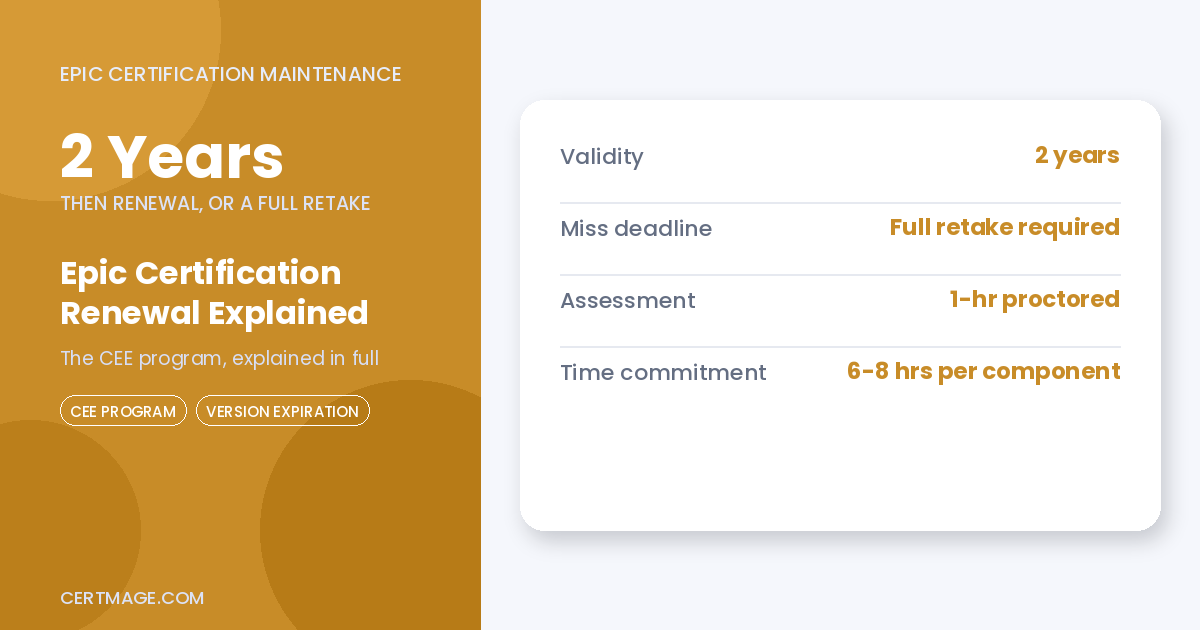
Epic certifications are typically valid for 2 years, but the number that matters more than the expiration date itself is what happens if you miss it: your certification lapses, and you cannot simply renew it. You have to retake every required exam for the current version from scratch. Understanding how Epic’s renewal system actually works, what happens if you fail the renewal exam multiple times, and what your realistic options are if you decide not to bother, is the difference between a routine continuing education requirement and a genuine career decision point.
The System Behind Renewal: Continuing Epic Education
Epic’s current renewal framework is called Continuing Epic Education, or CEE. It replaced an older system that relied almost entirely on New Version Training, a lighter-weight requirement involving a brief online review of new features followed by a short, non-proctored quiz that could be retaken an unlimited number of times until you passed. CEE kept New Version Training in place for some purposes but added 2 more substantial components on top of it, historically expected roughly every 5 years and required to be completed in the same year, though current guidance points to a tighter 2-year renewal cadence for maintaining active certification status overall.
| CEE Component | What It Involves | Time Commitment | Passing Score |
| New Version Training (NVT) | Brief online review of new features, then a short quiz | Relatively light | Retakeable unlimited times until passed |
| Application Essentials Assessment | Reinforces knowledge of core application concepts covered in original training, includes a proctored assessment component | 6 to 8 hours total, including a 1-hour proctored assessment | 80 percent or higher |
| Booster Training | Covers more in-depth application features, delivered as a recorded webcast, self-study material, or instructor-led virtual class | Roughly 6 to 8 hours, similar to Application Essentials | 80 percent or higher |
Key point: The Application Essentials Assessment and Booster Training are meaningfully more rigorous than the original New Version Training requirement they supplemented. Both require an 80 percent passing score, both are proctored or otherwise formally assessed, and unlike NVT’s unlimited retakes, both carry a real penalty for repeated failure. Candidates who treat renewal as a formality, the way the old NVT-only system allowed, are underprepared for how substantive this component actually is.
What Happens If You Fail Multiple Times
This is a detail most guides skip entirely, and it matters. If you fail the Application Essentials Assessment 3 times, you don’t just get a fourth attempt at the same test, you’re required to retake all the courses associated with that certification before you’re allowed to attempt the assessment again. The same rule applies separately to Booster Training: fail it 3 times, and you have to retake the instructor-led virtual class or self-study material for that specific component before attempting the assessment again. This turns a failed renewal exam from a minor inconvenience into a real time commitment, since you’re not just re-sitting a test, you’re redoing the coursework that led up to it.
What Happens If You Miss the Deadline Entirely
If your CEE requirements aren’t completed by the due date, your certification doesn’t just go into a grace period, it lapses, and it cannot be renewed. To regain certified status, you have to retake all required exams for whatever the current version is at that point. This is a meaningfully bigger task than simply completing the CEE components on time would have been, since you’re now testing on the current version’s full material rather than just the incremental updates CEE was designed to cover.
Note on deadline flexibility: Epic has, at least once in the program’s history, extended a CEE deadline by a month in response to widespread candidate concern about a specific cycle. This isn’t a guarantee, and you shouldn’t plan your renewal timeline assuming an extension will happen, but it’s worth knowing that Epic has shown some flexibility under specific circumstances rather than treating every deadline as an absolutely immovable cliff edge.
Versions and Environments Expire on Their Own Timeline
Separately from your personal certification renewal clock, Epic’s software versions and the project environments you train and test in also have their own expiration dates. Your class attendance still counts even after a version expires, but you eventually lose the ability to test or build on that expired version entirely. Epic doesn’t spring this on candidates without warning, expiration dates for your specific assigned environments show up as soon as you’re assigned them, and they continue to appear as a reminder on the Training Home page every time you log into Epic UserWeb.
The real risk shows up when life gets in the way of a tight timeline. If you start working on a project in a version or environment that retires before you finish, that work is lost. You then have to learn the new version, using materials that are genuinely different from what you were studying, and complete that new version’s projects and tests from the beginning. This isn’t a hypothetical edge case, it’s a documented, common experience among Epic consultants working through certification while also managing a live implementation project.
The Question Nobody Asks Out Loud: What If I Just Let It Lapse?
Here’s something worth saying plainly, because most official guidance won’t: letting a certification lapse doesn’t automatically end your Epic career. One experienced Epic consulting advisor, writing directly to consultants weighing this exact decision, put it this way: many clients hire based on real, demonstrated experience rather than an active certification badge alone, and full-time support roles specifically remain in demand for anyone with genuine Epic experience, certified or not. If your career has shifted toward training, project management, or a role where you haven’t touched build work in years, you may genuinely be fine without maintaining the credential. Removing a certified designation from your resume can feel like a real loss, but it doesn’t automatically remove you from consideration for every future role.
That said, this is a real tradeoff, not a reason to ignore renewal casually. The advisor’s own framework for making this decision comes down to 2 honest questions: how many certifications do you currently hold, and how many have you actually used or supported in the last 12 months? A certification you haven’t touched in years, in a module you no longer work with, is a much lower-stakes one to let lapse than a certification tied directly to your current, active role.
What “Credentialed Trainer” Confuses People About
One genuine source of confusion worth clearing up here: Epic’s Credentialed Trainer path and the standard build or analyst certification path are frequently treated as interchangeable in guides covering this topic. They are not the same program, and they don’t follow identical renewal or initial qualification structures. Credentialed Trainer certification, for instance, is sometimes offered through a tiered structure set by your specific sponsoring organization rather than a single universal Epic policy, one healthcare system’s documented approach requires candidates with less than a year of Epic experience to complete a 4-hour instructor-led class, while candidates with a year or more of experience can opt for a shorter online assessment requiring an 80 percent passing score, with up to 3 attempts before being routed back to the full instructor-led course. If you’re researching renewal requirements and keep finding information that doesn’t quite match what you’re seeing on your own UserWeb account, confirming whether you’re looking at Credentialed Trainer-specific guidance versus standard build certification guidance is a good first troubleshooting step.
Why This Matters More for Consultants Than End Users
Analysts, consultants, and build-side professionals feel this system far more directly than clinical end users. If your role involves ongoing certification maintenance across multiple modules or projects, tracking CEE deadlines, version expiration dates, and environment retirement schedules becomes a genuine part of your job, not a once-every-few-years afterthought. Consulting firms staffing Epic implementations specifically build internal tracking around this, since a lapsed certification can affect which projects a consultant is eligible to be staffed on, which is exactly why the “should I bother renewing” question above comes up so often specifically among consultants weighing time investment against actual project demand for a given module.
Renewal Requirements at a Glance
| Requirement | Consequence of Missing or Failing It |
| Complete CEE components by the due date | Certification lapses, requiring a full retake of current-version exams to regain status |
| Pass Application Essentials Assessment within 3 attempts | On a 4th failure, required to retake all associated coursework before attempting again |
| Pass Booster Training assessment within 3 attempts | On a 4th failure, required to retake the instructor-led class or self-study material before attempting again |
| Finish project work before your assigned environment expires | Work in progress is lost and must be redone on the new version |
| Stay aware of version expiration timelines | Losing ability to test or build on that version, even though prior class attendance still counts |
Decision Checklist
- Check your Epic UserWeb Training Home regularly, not just when you remember to. Expiration dates for your specific environments and CEE deadlines are displayed there directly, and this is Epic’s primary way of giving you advance warning.
- Treat the Application Essentials Assessment and Booster Training as real, 80-percent-threshold assessments requiring genuine preparation, not a formality like the older New Version Training quiz.
- If you’re mid-project when a version or environment approaches its expiration date, prioritize finishing that specific work before the deadline rather than assuming you can pick it up later, since incomplete work on an expiring version is lost entirely.
- If you’re a consultant managing certification across multiple modules or client projects, build your own tracking system for CEE deadlines and environment expiration dates rather than relying solely on Epic’s reminders, especially during busy implementation periods.
- Before your third attempt at either CEE assessment, seriously reconsider your preparation approach, since a fourth failure means redoing full coursework, not just paying for another test attempt.
- If you’re genuinely unsure whether maintaining a specific certification is worth the time investment, ask yourself honestly how recently you’ve actually used it in real project work, not just whether letting it lapse feels uncomfortable.
- Confirm whether guidance you’re reading applies to standard certification renewal or the separate Credentialed Trainer path, since the 2 are commonly and incorrectly treated as identical.
For the complete overview of how Epic certification works from initial training through cost and career paths, see our Epic Certification guide. If you’re still deciding which module to certify in initially, see our Epic Ambulatory vs Inpatient (ClinDoc) Certification comparison, and if you’re planning your path into Epic certification from outside healthcare entirely, see our guide on how to get Epic certified without already working in healthcare IT.
FAQS
How long is an Epic certification valid before renewal is required?
Typically 2 years under current guidance, after which Continuing Epic Education requirements must be completed to maintain certified status, though the underlying CEE assessment cycle has historically been described as roughly every 5 years for candidates whose original certification predates more recent policy updates.
What happens if I miss my Epic certification renewal deadline?
Your certification lapses and cannot simply be renewed. You must retake all required exams for the current version to regain certified status.
What is the Continuing Epic Education (CEE) program?
Epic’s current renewal framework, combining New Version Training with 2 additional components, an Application Essentials Assessment and Booster Training, both requiring an 80 percent passing score and roughly 6 to 8 hours each.
What happens if I fail the Application Essentials Assessment 3 times?
You’ll need to retake all courses associated with that certification before you’re allowed to attempt the assessment again, a meaningfully larger time commitment than simply retaking the test.
Can I just let my Epic certification lapse without ending my career in this field?
In many cases, yes. Experienced consultants note that real, demonstrated project experience often carries more weight with employers than an active certification badge alone, particularly for professionals in training, project management, or roles removed from active build work.
What happens to my project work if the version I’m working on expires?
If you haven’t completed that work before the version or environment retires, it’s lost, and you’ll need to redo it using the new version’s materials and requirements.
Does Epic ever extend CEE deadlines?
It has happened at least once in the program’s history, with a deadline pushed back by a month, but this shouldn’t be relied upon or assumed for any specific renewal cycle.
Is Credentialed Trainer certification the same as standard Epic certification renewal?
No, and this is a common point of confusion. Credentialed Trainer qualification and renewal can follow a structure set by your specific sponsoring organization, which may differ from the universal CEE process governing standard build and analyst certifications.
Does Epic warn candidates before a version or environment expires?
Yes. Expiration dates appear as soon as you’re assigned a specific environment, and they continue to display on the Epic UserWeb Training Home page as a reminder.