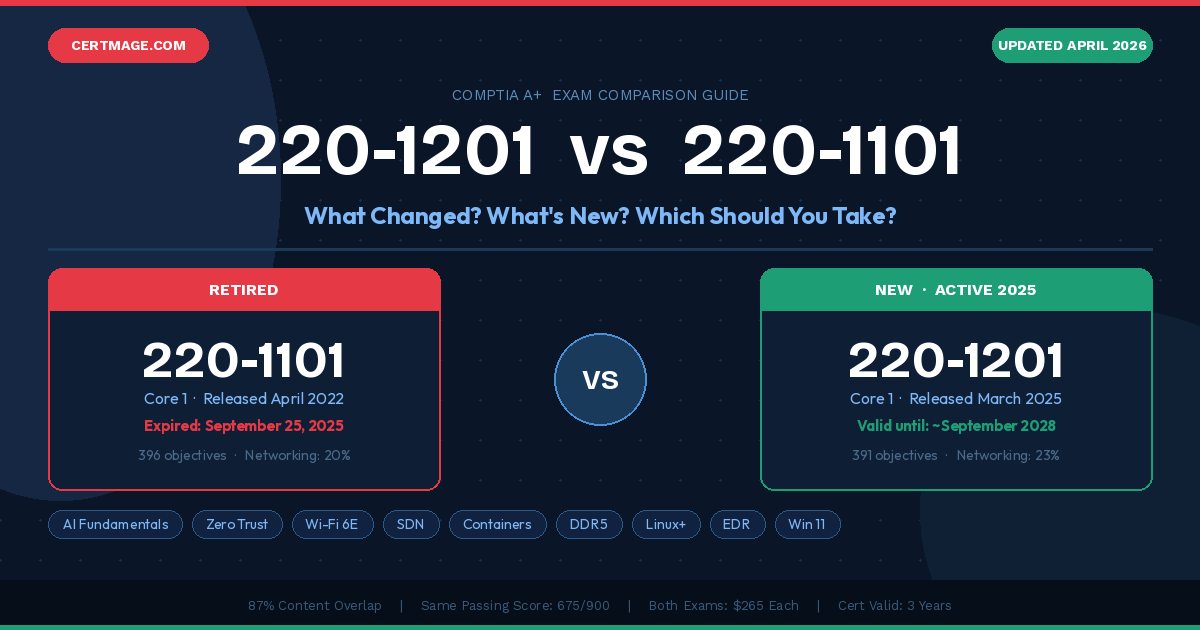
Direct Answer: The CompTIA A+ 220-1201 is the brand new version launched on March 25, 2025. It permanently replaced the old 220-1101, which was retired on September 25, 2025 and can no longer be taken. The two exams share approximately 87% of the same content, but the new 220-1201 introduces AI fundamentals in IT support, Zero Trust security architecture, Wi-Fi 6E (6 GHz), Software-Defined Networking (SDN), deeper Windows 11 and Linux coverage, and expanded cloud troubleshooting. The passing score for Core 1 is 675/900 and for Core 2 is 700/900. If you are starting your A+ journey in 2025 or 2026, you have one option: study for 220-1201 and 220-1202.
Introduction: Why Thousands of Candidates Are Confused Right Now
Let’s be honest about something. If you searched “220-1201 vs 220-1101,” you are probably sitting with a mix of panic and frustration right now. Maybe you have already bought study guides for the old version. Maybe you spent weeks studying and just discovered the exam you were preparing for no longer exists. Maybe you are a complete beginner trying to figure out where to even start.
Whatever the situation, you deserve a real answer, not a vague overview that leaves you with more questions than you started with.
This guide is built entirely around what you actually need to know as someone preparing for the CompTIA A+ certification in 2025 or 2026. We will cover every single meaningful difference between the 220-1101 and 220-1201 exams, break down the new topics domain by domain, explain what was removed and why, show you a realistic study plan based on your background, and give you honest salary and career data so you can decide whether this certification is actually worth your time and money.
Everything here is based on the official CompTIA exam objectives documents and verified data from CompTIA’s own website. No guesswork, no outdated information recycled from three years ago.
A Quick History: How CompTIA Updates the A+ Exam
Before we dive into the specific differences, it helps to understand why CompTIA updates the A+ exam at all.
CompTIA refreshes the A+ approximately every three years. The reason is straightforward: technology moves fast. An IT support technician working in 2025 deals with completely different challenges than one working in 2018. Cloud services, remote work infrastructure, AI-assisted tools, modern cybersecurity threats, and new hardware standards have all fundamentally changed what entry-level IT professionals actually do on the job.
Each update cycle starts with a Job Task Analysis (JTA) workshop where CompTIA brings together working IT professionals from across the industry. These subject matter experts review current job postings, survey IT managers about what skills they actually need from entry-level hires, and identify which topics on the current exam have become outdated. The result is a revised set of exam objectives that reflects real-world IT work rather than what IT looked like three years ago.
The version history of CompTIA A+ Core 1 looks like this:
- 220-1001 — Released 2019, retired 2022. Covered the IT landscape of that era.
- 220-1101 — Released April 20, 2022, retired September 25, 2025. Reflected the post-pandemic shift to remote work and cloud adoption.
- 220-1201 — Released March 25, 2025, estimated retirement September 2028. Reflects AI integration in IT, Zero Trust security, and modern hybrid workforce environments.
The jump from 220-1101 to 220-1201 is significant because it captures one of the most dramatic periods of technological change in IT history — the mainstreaming of AI tools, the widespread adoption of cloud-native applications, and the fundamental shift in how organizations think about security.
Section 1: The Essential Facts — Side by Side
Before anything else, here are the hard facts you need to know:
| Detail | Old: 220-1101 / 220-1102 | New: 220-1201 / 220-1202 |
| Release Date | April 20, 2022 | March 25, 2025 |
| Retirement Date | September 25, 2025 (English) | Estimated September 2028 |
| Current Status | RETIRED — cannot be taken | Active and available now |
| Total Objectives (Core 1) | ~396 objectives | ~391 objectives |
| Content Overlap | — | 87% same as 220-1101 |
| New Content | — | 13% completely new topics |
| Question Types | Multiple-choice, drag-and-drop, performance-based | Multiple-choice, drag-and-drop, performance-based |
| Max Questions per Exam | 90 questions | 90 questions |
| Time Limit | 90 minutes | 90 minutes |
| Passing Score — Core 1 | 675 / 900 | 675 / 900 |
| Passing Score — Core 2 | 700 / 900 | 700 / 900 |
| Exam Cost | $265 USD per exam | $265 USD per exam |
| Total Cost (Both Exams) | $530 USD | $530 USD |
| Recommended Experience | 12 months hands-on IT support | 12 months hands-on IT support |
| Prerequisites | None formally required | None formally required |
| DoD 8140 Approved? | Yes | Yes |
| Certification Validity | 3 years from passing date | 3 years from passing date |
| Can You Mix Versions? | — | Absolutely not |
| Languages Available | English, German, Japanese | English, German, Japanese |
| Estimated Validity Until | Retired | ~September 2028 |
Critical Warning: You cannot combine a pass from the old series with a pass from the new series. If you passed 220-1101 (Core 1) but failed to pass 220-1102 (Core 2) before September 25, 2025, your 220-1101 pass is now worthless for certification purposes. You must start completely from scratch with 220-1201 and 220-1202.
Section 2: Domain Structure — Core 1 (220-1101 vs 220-1201)
The CompTIA A+ Core 1 exam is divided into five domains. Here is how the domain weights changed between the old and new versions:
| Domain | 220-1101 Weight | 220-1201 Weight | Change |
| 1.0 Mobile Devices | 15% | 13% | ↓ Decreased by 2% |
| 2.0 Networking | 20% | 23% | ↑ Increased by 3% |
| 3.0 Hardware | 25% | 25% | → No change |
| 4.0 Virtualization and Cloud Computing | 11% | 11% | → No change |
| 5.0 Hardware and Network Troubleshooting | 29% | 28% | ↓ Decreased by 1% |
What does this tell us? Networking is now the second-most tested domain on the Core 1 exam, and the increase reflects the reality that modern IT support increasingly involves cloud-connected systems, software-defined networks, and hybrid infrastructure. Even entry-level technicians are expected to understand network concepts at a deeper level than they were in 2022.
Hardware and Network Troubleshooting remains the single heaviest domain at 28%, confirming that hands-on problem-solving ability is still the core of what CompTIA A+ is about. The slight reduction in Mobile Devices makes sense — while smartphones are everywhere, the most rapidly changing aspects of mobile technology are now covered in other areas like networking and security.
Core 2 (220-1102 vs 220-1202) Domain Structure
| Domain | 220-1102 Weight | 220-1202 Weight | Change |
| 1.0 Operating Systems | 31% | 31% | → No change |
| 2.0 Security | 25% | 25% | → No change |
| 3.0 Software Troubleshooting | 22% | 22% | → No change |
| 4.0 Operational Procedures | 22% | 22% | → No change |
The Core 2 domain weights are unchanged between versions. The significant changes in Core 2 are in the specific topics and technologies covered within each domain, not in the domain weighting itself.
Section 3: What Is Actually New in 220-1201 — Complete Topic-by-Topic Breakdown
This is the section most guides get wrong because they list vague generalities rather than specific topics. Here is the complete breakdown of genuinely new content in the 220-1201 exam, organized by domain.
Domain 1: Mobile Devices — What Changed
Mobile Devices dropped from 15% to 13%, and several outdated mobile technology topics were removed. The new content in this domain focuses on:
New Topics Added:
- Modern Mobile OS Management — expanded coverage of enterprise mobile device management (MDM) platforms and how IT support professionals manage corporate-owned and bring-your-own-device (BYOD) policies at scale
- USB-C and Thunderbolt Integration — the new exam reflects the industry’s near-complete transition to USB-C and Thunderbolt, with more detailed coverage of connector types, data transfer speeds, and charging protocols
- Advanced Display Technology — mini-LED displays, high refresh rate screens (120Hz+), pixel density standards, and expanded color gamut troubleshooting now appear explicitly in the objectives
- 6 GHz Wireless Connectivity — Wi-Fi 6E operates on the 6 GHz band and is now covered in the mobile context, as modern laptops and high-end mobile devices support it
- Biometric Authentication — fingerprint readers, facial recognition systems, and how they integrate with modern OS security are now explicitly tested
Topics Reduced or Reframed:
- Legacy Bluetooth versions and older wireless protocols received reduced coverage
- Older mobile OS features that are now standardized were simplified
- Physical keyboard and trackpad hardware specifics were slightly reduced in favor of touchscreen and stylus coverage
Domain 2: Networking — What Changed (The Biggest Shift)
Networking grew from 20% to 23%, making this the domain with the most significant change in emphasis. This is where the 220-1201 most clearly reflects the modern IT environment.
New Topics Added:
- Wi-Fi 6E and 6 GHz Band Operation — Wi-Fi 6E is the most significant wireless standard since Wi-Fi 6, introducing the 6 GHz frequency band to reduce congestion in dense environments. Entry-level technicians are now expected to understand how to configure and troubleshoot Wi-Fi 6E networks, identify interference sources in the new spectrum, and explain the performance advantages to end users.
- Software-Defined Networking (SDN) — SDN separates the network control plane from the data forwarding plane, allowing centralized network management through software. This was an enterprise-only concept five years ago but is now common enough that help desk technicians encounter SDN-managed networks regularly. The exam tests conceptual understanding of SDN architecture, not deep configuration skills.
- Long-Range Wireless Technologies — LoRa (Long Range) and other IoT-oriented wireless protocols now appear in the objectives as organizations deploy more connected devices and expect IT staff to support them
- Network Virtualization Concepts — the boundary between physical networking and virtual networking has blurred significantly. The 220-1201 expands coverage of virtual switches, VLANs in virtualized environments, and cloud networking fundamentals
- IPv6 Expanded Coverage — while IPv6 appeared in the 220-1101, the 220-1201 increases its depth, reflecting that many organizations have now completed or are actively undergoing IPv6 transitions
Topics Retained and Deepened:
- TCP/IP protocol suite, ports, and protocols remain heavily tested
- DNS, DHCP, and basic network services are unchanged
- SOHO network configuration remains a core competency
- Network troubleshooting tools (Wireshark concepts, ping, traceroute, netstat) remain
Domain 3: Hardware — What Changed
Hardware maintained its 25% weight, which reflects that physical troubleshooting remains a core job function. However, the specific technologies covered have been updated significantly.
New Topics Added:
- M.2 NVMe Storage Standards — M.2 form factor drives using NVMe protocol are now the dominant storage solution in new systems. The 220-1201 deepens coverage of NVMe vs. SATA M.2, PCIe generation differences, and how to identify and install M.2 drives correctly
- DDR5 Memory — DDR5 RAM is now mainstream in new systems. The exam covers DDR5 specifications, performance characteristics, and compatibility considerations that did not apply to DDR4-era systems
- Modern PSU Standards — ATX 3.0 power supply standards with 12VHPWR connectors for high-end GPUs are now covered
- USB4 and Thunderbolt 4 — updated connector and speed standards reflecting current hardware
- Cooling Technologies — expanded coverage of modern thermal management including liquid cooling systems and heat pipe designs that appear in workstations technicians may service
Topics Removed:
- Legacy IDE hard drive interfaces
- Older SATA revision specifics
- VGA and older display connector deep coverage
- Legacy RAM types (DDR2, DDR3 specifics reduced)
Domain 4: Virtualization and Cloud Computing — What Changed
This domain maintained its 11% weight but received some of the most substantive topic updates in the entire exam, reflecting how dramatically cloud adoption has accelerated since 2022.
New Topics Added:
- Container Technology — Docker and container concepts are now explicitly included. Entry-level IT professionals increasingly encounter containerized applications, and the 220-1201 introduces the conceptual foundation of containers, images, and container registries
- Virtual Desktop Infrastructure (VDI) Expanded — with remote work now the norm rather than the exception, VDI has become a mainstream enterprise solution. The 220-1201 expands VDI coverage including thin client configurations, desktop pools, and common troubleshooting scenarios
- Type I vs Type II Hypervisor Distinction — the exam now more explicitly tests the difference between bare-metal hypervisors (Type I: VMware ESXi, Microsoft Hyper-V) and hosted hypervisors (Type II: VirtualBox, VMware Workstation) and when each is used
- Cloud-Native Application Support — supporting users who work entirely within cloud applications (Microsoft 365, Google Workspace, Salesforce) requires different troubleshooting approaches than traditional installed software. This is now explicitly covered
- SaaS/PaaS/IaaS Practical Application — moved beyond definition memorization to scenario-based questions about which model applies to specific business situations
- AI-Assisted IT Tools — a new sub-topic covering how AI tools (like automated diagnostics, chatbots, and predictive maintenance systems) are integrated into modern IT support workflows
Domain 5: Hardware and Network Troubleshooting — What Changed
The heaviest domain at 28% (down from 29%) saw mostly updates to the types of hardware and network environments being troubleshot, rather than entirely new troubleshooting concepts.
New/Updated Coverage:
- Remote Troubleshooting Workflows — the post-pandemic reality is that many IT issues are now diagnosed and resolved remotely. The 220-1201 explicitly includes remote access tools, screen sharing platforms, and the unique challenges of troubleshooting hardware you cannot physically touch
- Cloud Connectivity Troubleshooting — diagnosing problems with cloud-connected systems, VPN connectivity, and hybrid environment issues
- Wi-Fi 6E and Modern Wireless Troubleshooting — identifying and resolving issues specific to new wireless standards
- SSD-Specific Failure Modes — as SSDs have replaced HDDs in most systems, the failure modes are different. The 220-1201 better reflects SSD-specific diagnostics
Section 4: New Topics in Core 2 (220-1202 vs 220-1102)
Domain 1: Operating Systems — What Changed
Windows 11 Deep Dive: The 220-1102 included Windows 10 as the primary focus. The 220-1202 makes Windows 11 the primary OS while retaining Windows 10 coverage. New Windows 11 specific content includes:
- TPM 2.0 requirements and how to enable/verify TPM in UEFI settings
- The new Windows 11 Start menu, taskbar, and Settings app layout
- Windows 11 security features including Smart App Control, Virtualization-Based Security (VBS), and Windows Hello
- Microsoft Account integration and its impact on enterprise management
- DirectStorage and how it changes storage configuration recommendations
Expanded Linux Coverage: Linux receives significantly more attention in the 220-1202 than it did in the 220-1102, reflecting how common Linux is in cloud environments, developer workstations, and even end-user computing:
- Common Linux distributions relevant to IT support (Ubuntu, Red Hat family, Debian)
- Essential command-line operations: file management, permissions, process management, package management
- Linux file system hierarchy and how it differs from Windows
- Remote access via SSH and basic scripting concepts
- Linux in containerized environments
macOS Updates:
- Coverage updated to reflect current macOS versions (Ventura, Sonoma era)
- Apple Silicon (M-series chips) and how they differ from Intel-based Macs for support purposes
- macOS security features: Gatekeeper, System Integrity Protection, FileVault
Domain 2: Security — What Changed (Most Significant Core 2 Update)
Security received the most substantive updates of any Core 2 domain, reflecting the dramatically changed threat landscape since 2022.
Zero Trust Architecture: Zero Trust is now explicitly tested. The core principle — “never trust, always verify” — has moved from an enterprise buzzword to a foundational security concept that entry-level technicians need to understand. The exam tests:
- What Zero Trust means conceptually and how it differs from perimeter-based security
- How Zero Trust applies to endpoint security and access control
- Identity verification and least-privilege access in Zero Trust environments
- How to explain Zero Trust concepts to end users and management
Endpoint Detection and Response (EDR): Traditional antivirus has been largely replaced by EDR platforms in enterprise environments. The 220-1202 introduces EDR concepts:
- How EDR differs from traditional antivirus
- Common EDR platform concepts (CrowdStrike, Microsoft Defender for Endpoint, etc. — conceptually, not vendor-specific)
- What EDR alerts mean and how help desk technicians respond to them
- Incident escalation workflows when EDR detects a threat
Multi-Factor Authentication (MFA) Expanded: MFA has become non-negotiable in enterprise security, and its coverage reflects this:
- TOTP (Time-based One-Time Password) authenticator apps
- Hardware security keys (FIDO2/WebAuthn)
- Push notifications and their security implications
- SMS-based MFA and its known weaknesses
- Supporting users who are locked out of MFA
Modern Malware and Social Engineering:
- Ransomware-as-a-Service (RaaS) model and why it has made ransomware more common
- Business Email Compromise (BEC) and how it differs from phishing
- Supply chain attacks as a category
- AI-generated phishing and deepfake social engineering
Domain 3: Software Troubleshooting — What Changed
- Expanded cloud application troubleshooting — diagnosing issues with Microsoft 365, Google Workspace, browser-based applications
- Mobile application management troubleshooting
- Modern browser security features and how they affect application behavior
- Containerized application basic troubleshooting concepts
Domain 4: Operational Procedures — What Changed
- Remote work security procedures — VPN policies, home network security recommendations, endpoint protection for remote workers
- Environmental and safety considerations updated for modern equipment
- Data disposal and privacy regulations — expanded to reflect GDPR awareness and data handling requirements that affect IT support workflows
- Documentation standards for modern ticketing systems and knowledge bases
- Hybrid workforce support procedures
Section 5: What Was Removed From the New Exam
Understanding what was removed is just as important as knowing what was added. CompTIA does not remove topics arbitrarily — they remove content that IT professionals no longer encounter in real entry-level jobs.
Hardware and Connectivity Removed or Significantly Reduced:
- VGA connectors and ports — virtually no new system ships with VGA. It was reduced to legacy/compatibility context only
- IDE/PATA hard drive interfaces — completely removed. No modern system uses IDE storage
- Parallel and Serial ports — removed from practical coverage (still appear in legacy awareness context only)
- Legacy Bluetooth versions (1.x, 2.x specifics) — reduced to modern Bluetooth coverage
- FireWire/IEEE 1394 — removed entirely from the objectives
- Older DDR specifications — DDR2 and DDR3 specifics significantly reduced
- Older expansion cards — ISA, older AGP specifics removed
Networking Topics Removed or Reduced:
- Legacy wireless standards (802.11a, 802.11b detail) — reduced to historical awareness only
- Older VPN protocols — PPTP detailed coverage removed (security concerns make it obsolete)
- Some legacy network hardware specifics — older hub/repeater technology
Software and OS Topics Removed:
- Windows 7 and Windows 8 detailed coverage — significantly reduced. Windows 7 is end-of-life and Windows 8 was largely skipped by enterprises
- Legacy boot processes — deep BIOS/MBR specifics reduced in favor of UEFI
- Older malware removal step-by-step procedures — replaced with scenario-based approaches
- Troubleshooting methodology as a standalone tested objective — still emphasized as a practice but no longer appears as a separate exam objective. It is embedded in scenario questions throughout
Why This Matters For You: If you are using a study guide written for the 220-1101 and it has extensive coverage of IDE drives, Windows 7 troubleshooting, or VGA port specifications, you are spending study time on content that will not appear on your exam. This is not just wasted time — it crowds out study time for the new content that will appear.
Section 6: Who Should Take Which Version — Complete Decision Guide
Since many people find themselves in different situations, here is a complete decision guide covering every scenario:
| Your Current Situation | What You Should Do | Why |
| Complete beginner, starting fresh in 2025 or 2026 | Study for 220-1201 and 220-1202 from day one | The old exams are retired. There is no other option |
| Purchased 220-1101 study materials before retirement | Use them for the 87% overlap, supplement with 220-1201 new topic resources | Your existing materials are not worthless — they cover most of the content |
| Passed 220-1101 but never took 220-1102 | Start over entirely with 220-1201 and 220-1202 | Your 220-1101 pass cannot be combined with 220-1202. It is unfortunately not usable |
| Passed both 220-1101 AND 220-1102 before September 25, 2025 | Nothing — you are fully certified | Your A+ certification is valid for 3 years from your Core 2 pass date |
| A+ certified, renewal coming up | Pass 220-1201/1202, earn a higher CompTIA cert, or accumulate CE credits | Multiple renewal paths available through CompTIA’s CE program |
| IT professional with experience, just need the cert | Study for 220-1201 and 220-1202 — focus on new topics | Your experience covers most of the content. Study time needed: 3-5 weeks |
| Taking the exam in a language other than English | Check CompTIA’s website for language availability | Non-English versions of the old exam had later retirement dates |
Section 7: Complete Domain-by-Domain Study Strategy for 220-1201
Knowing what is on the exam is only half the battle. Here is a proven strategy for studying each domain effectively.
How to Approach Domain 1: Mobile Devices (13%)
Mobile Devices is the smallest domain, and many candidates make the mistake of skipping it entirely. Do not do this. 13% of your score is still 13%, and mobile device questions are often the most straightforward on the exam — they are free points if you study them.
Focus your Mobile Devices study on:
What to prioritize: iPhone and Android device management from an IT support perspective — how to factory reset, enroll in MDM, configure email, troubleshoot connectivity issues. These are real help desk scenarios. Understand the difference between iOS and Android from a management standpoint. Know your connector types cold: USB-C, Lightning (legacy), Thunderbolt, and the charging/data capabilities of each.
Common exam question patterns: “A user’s company-issued iPhone is not syncing with the corporate MDM system after an iOS update. What is the most likely cause?” — These are scenario-based questions that test whether you understand the MDM enrollment process, not whether you memorized a list of features.
Lab exercise: If you have a smartphone, go through the settings menus systematically. Find where VPN configurations live, where app permissions are managed, where device encryption settings are, and how to enable remote wipe. This hands-on familiarity will answer many exam questions more reliably than memorization.
How to Approach Domain 2: Networking (23%)
Networking is the domain that trips up most A+ candidates because it feels abstract until it clicks. Here is how to make it click.
The foundation you must have: Understand the OSI model and TCP/IP stack not as a list to memorize but as a mental framework for troubleshooting. When something does not work, where in the stack is the problem? Layer 1 (physical cables)? Layer 2 (switch/MAC issues)? Layer 3 (IP routing)? This thinking pattern is what scenario questions are testing.
IP addressing is non-negotiable: You need to be able to look at an IP address and subnet mask and immediately identify whether two devices are on the same subnet. Practice subnetting with real examples until it is automatic. The exam will give you scenarios where you need to identify misconfigured IP addresses without time to struggle.
New topics to master: Wi-Fi 6E is testable. Know that it adds the 6 GHz band, which provides more channels and less congestion but shorter range than 5 GHz. Know that Wi-Fi 6E devices need to be within range of a Wi-Fi 6E capable access point to benefit. Understand SDN conceptually — know that it separates the control plane from the data plane and enables centralized network management through software.
Lab exercise: Set up a home router (even a cheap one from a thrift store works). Configure DHCP, set up a guest network, configure WPA3 security, look at the MAC address table, set up port forwarding. This hands-on experience will make networking questions feel like common sense rather than abstract facts.
How to Approach Domain 3: Hardware (25%)
Hardware is where many candidates feel most comfortable, but the 220-1201 has updated content that requires attention even for experienced technicians.
Storage is critical: Understand the full spectrum of modern storage — NVMe M.2 (PCIe Gen 4 vs Gen 5 speeds), SATA M.2, 2.5″ SATA SSD, and how each connects, performs, and is installed. Know when you would choose each type. Know failure symptoms unique to SSDs (sudden death, wear leveling effects) vs traditional HDDs (clicking sounds, progressive degradation).
RAM specifications matter: Know DDR4 vs DDR5 differences — DDR5 starts at 4800 MT/s vs DDR4’s 3200 MT/s maximum, DDR5 has integrated power management, DDR5 uses a different physical slot and is not backward compatible. Know what ECC RAM is and when it is used.
Display technology updated: Mini-LED displays use smaller LEDs for local dimming, resulting in better contrast ratios and HDR performance. OLED offers pixel-level dimming but has burn-in risk. These are relevant for troubleshooting display issues — a display that looks “blown out” in bright areas may have local dimming issues.
Lab exercise: Build or disassemble a PC at least once. If you do not have access to real hardware, use virtual labs. Identify every component, understand what each does, and practice the assembly process. Performance-based questions on the A+ exam frequently simulate installation tasks.
How to Approach Domain 4: Virtualization and Cloud Computing (11%)
Despite being only 11% of the exam, this domain has seen some of the most significant updates and deserves careful attention.
Cloud models — beyond definitions: The exam does not just ask you to define IaaS, PaaS, and SaaS. It gives you scenarios and asks which model applies. “A company uses Microsoft Azure to run virtual machines where they install and manage their own operating systems and applications — which cloud model is this?” (IaaS). “A development team deploys their web application to Google App Engine without managing the underlying servers — which model?” (PaaS). Practice applying these, not just reciting them.
Containers are new territory: Understand that containers are lightweight virtualization that package an application and its dependencies together. Unlike VMs, containers share the host OS kernel. Docker is the most common container technology. Containers start faster and use less resources than full VMs but provide less isolation. The exam tests these concepts, not Docker command syntax.
Hypervisor types matter: Type 1 (bare-metal) hypervisors run directly on hardware — VMware ESXi, Microsoft Hyper-V (when installed directly), Citrix Hypervisor. These are used in enterprise server environments. Type 2 (hosted) hypervisors run on top of a host OS — VMware Workstation, Oracle VirtualBox, Parallels. These are used on developer and power-user workstations. Know which is which and when you would use each.
How to Approach Domain 5: Hardware and Network Troubleshooting (28%)
This is the most heavily weighted domain and the one where real hands-on experience has the biggest advantage. But you can still ace it without years of experience if you study scenarios correctly.
The troubleshooting mindset: Even though the troubleshooting methodology is no longer a standalone tested objective, every scenario question in this domain tests whether you apply it. The methodology steps — identify the problem, establish a theory, test the theory, establish a plan, implement the solution, verify full functionality, document — should be second nature. Run through this mentally before selecting an answer.
Common scenario patterns to master:
- A PC does not POST (Power On Self Test) — what are the possible causes in order of likelihood? (RAM, GPU, CPU, PSU, motherboard — know how to isolate each)
- A user cannot connect to a network share — where do you start troubleshooting? (Verify physical connection → check IP configuration → verify DNS resolution → check share permissions → check firewall rules)
- A display shows distorted colors or artifacts — what are the likely causes? (Check cable connections first, then test with known-good cable, check GPU temperatures, test with different monitor)
- A laptop battery drains faster than expected — what do you check? (Battery health in OS, background applications, display brightness, power settings, age of battery)
Remote troubleshooting scenarios are new: The 220-1201 explicitly includes scenarios where you are troubleshooting remotely. Know your remote access tools — Remote Desktop Protocol (RDP), VNC, vendor-specific remote management tools. Know that remote troubleshooting has limitations — you cannot check physical cable connections, feel if a component is hot, or hear unusual sounds.
Section 8: Realistic Study Plans Based on Your Background
There is no one-size-fits-all timeline for A+ preparation. Here are realistic plans based on where you are starting from.
Plan A: Complete Beginner (No IT Background) — 12 Weeks
Weeks 1-2: Foundation Building Your goal these weeks is not to memorize exam content — it is to build a mental model of how computers and networks work. Watch Professor Messer’s free 220-1201 video course to get an overview of every domain. Do not try to take notes yet. Just watch and let the concepts start to settle.
Weeks 3-5: Core 1 Deep Study Work through the 220-1201 official exam objectives systematically. For each objective, find a resource that explains it clearly, then test yourself with practice questions. Focus on the domains in order of weight: Hardware and Network Troubleshooting (28%) → Hardware (25%) → Networking (23%) → Mobile Devices (13%) → Virtualization and Cloud (11%).
Weeks 6-7: Core 1 Practice and Reinforcement Take full-length Core 1 practice exams. Do not be discouraged by low scores — the goal is to identify weak areas. For every question you get wrong, understand why the correct answer is correct, not just what the correct answer is.
Weeks 8-10: Core 2 Deep Study Repeat the same process for Core 2 (220-1202). Focus on Operating Systems (31%), Security (25%), Software Troubleshooting (22%), and Operational Procedures (22%).
Weeks 11-12: Full Review and Final Practice Take mixed Core 1 and Core 2 practice exams. Focus your final study sessions on your weakest topics. The night before each exam, review your notes but do not try to cram new material.
Daily study time: 1.5 to 2 hours per day, 5 days per week
Plan B: Some IT Experience (1-2 Years) — 6 Weeks
Week 1: Assessment and Gap Identification Take a full practice exam for both Core 1 and Core 2 immediately. Do not study first — you want an honest baseline. Your results will show exactly which domains need work.
Weeks 2-3: Core 1 Focused Study Work through each Core 1 domain, but spend time proportional to your assessment results. If networking was weak, spend extra time there. If hardware was strong, do a quick review and move on.
Weeks 4-5: Core 2 Focused Study Repeat for Core 2. Security is often the weakest area for technicians with infrastructure experience — pay extra attention to Zero Trust, EDR, and modern authentication.
Week 6: Final Practice and Scheduling Take final practice exams for both. Aim for consistent scores above 80% before scheduling your real exams.
Daily study time: 1 to 1.5 hours per day
Plan C: Transitioning From Old 220-1101 Study Materials — 3 Weeks
You are in a better position than you might think. 87% of the content overlaps, so your existing study is not wasted.
Week 1: Identify and Fill the 13% Gap Download the official 220-1201 and 220-1202 exam objectives and compare them against the 220-1101/1102 objectives. Highlight everything that is new or changed. These highlighted items are your entire study focus.
Key new areas to cover: Wi-Fi 6E and SDN (Networking), AI in IT support (Virtualization/Cloud), container concepts (Virtualization/Cloud), Zero Trust (Security), EDR (Security), Windows 11 specific features (Operating Systems), expanded Linux (Operating Systems), remote troubleshooting workflows (Troubleshooting), modern display technologies (Hardware), DDR5 and NVMe specifics (Hardware).
Week 2: Practice on New Topics Find practice questions specifically written for the 220-1201 objectives. Do not rely on your old practice question banks — they may not include the new material, and using only old questions creates a false sense of readiness.
Week 3: Full Practice Exams Take complete 220-1201 and 220-1202 practice exams. Verify your scores are consistently above 80% before scheduling.
Daily study time: 1.5 to 2 hours per day
Section 9: Performance-Based Questions — The Section Most Guides Ignore
Performance-based questions (PBQs) are unique to CompTIA exams and are frequently the most challenging question type. They are simulations where you interact with a virtual environment to complete a task rather than selecting from multiple choice answers.
What PBQs look like on the A+ exam:
- Configure a network adapter with specific IP address settings
- Identify the correct cable type and connector for a given scenario
- Match hardware components to their descriptions in a drag-and-drop format
- Walk through a troubleshooting sequence to identify the root cause of a simulated problem
- Configure basic SOHO router settings in a simulated interface
Why PBQs matter for your score: PBQs are typically worth more points than standard multiple-choice questions, though CompTIA does not publish exact point values. Candidates who skip or rush PBQs risk significantly impacting their final score.
How to prepare for PBQs: The only effective preparation for PBQs is hands-on practice. Use free virtual labs, set up VMs on your computer, practice configuring real hardware when possible. Reading about how to install RAM is far less effective preparation than actually installing RAM, even in a simulated environment.
When you encounter PBQs on the actual exam, they appear at the beginning. Many experienced candidates recommend answering PBQs last — flag them, complete all multiple-choice questions first, then return to PBQs with remaining time. This ensures you do not run out of time on easier questions because you spent too long on a complex simulation.
Section 10: Exam Day — What to Actually Expect
Before Your Exam
Register through Pearson VUE, which is CompTIA’s official testing partner. You can take the exam at a physical testing center or online through online proctoring. Both options are legitimate, but online proctoring has stricter environment requirements — you need a quiet room, a clean desk with nothing on it, and reliable internet.
Bring a valid government-issued photo ID. This is required — no exceptions. Your name on the ID must exactly match your name in the Pearson VUE system.
Arrive 15 minutes early for in-person exams. For online exams, complete the system check at least 30 minutes before your scheduled start time.
During Your Exam
The exam interface gives you a flag function — use it. Flag any question you are uncertain about and keep moving. Never spend more than 90 seconds on any single multiple-choice question. If you do not know the answer, make your best guess, flag the question, and move on. You can return to flagged questions if time permits.
Read every question completely before looking at the answer choices. Many A+ questions are deliberately worded to test whether you read carefully — the question often specifies “which is the MOST likely cause” or “which is the FIRST step” and the word choice matters enormously.
For scenario questions, identify the key constraint words: “most cost-effective,” “least disruptive,” “most secure,” “first step.” These words change which answer is correct.
After Your Exam
Your score appears immediately on screen after you complete the exam. If you pass, your official certification will be issued by CompTIA within 24-48 hours and will appear in the CompTIA portal. If you fail, you can retake the exam immediately for your first attempt. Subsequent retakes require a 14-day wait period.
There is no penalty for wrong answers on the A+ exam, so never leave a question blank. Always make your best guess.
Section 11: Is the CompTIA A+ 220-1201 Worth Your Time and Money in 2025/2026?
This is the question many guides avoid answering directly. Here is an honest breakdown.
The Cost Reality
Each A+ exam costs $265 USD, meaning the total minimum investment is $530 to get certified. If you fail either exam, each retake costs another $265. When you add study materials — a good study guide ($40-60), practice exams ($30-50), and potentially an online course ($50-200) — the total investment to earn the A+ can realistically reach $700-$1,000 for most candidates.
That is not a trivial amount. Is it worth it?
The Salary Data
Based on 2025-2026 data from Glassdoor, PayScale, and industry surveys:
| Job Role | Median Annual Salary (US) | A+ Typically Required? |
| Help Desk Technician | $64,000 | Often required or strongly preferred |
| IT Support Specialist | $71,000 | Often required |
| Desktop Support Specialist | $73,000 | Often required or preferred |
| Field Service Technician | $58,000 | Often required |
| Associate Network Engineer | $123,000 | Preferred (Network+ often also required) |
| IT Technician (General) | $55,000 – $65,000 | Very often required |
The median salary across A+ certified entry-level roles in the US is approximately $63,000 – $77,000 depending on the source. In major metropolitan areas, these figures are higher. In rural areas, they are lower.
For someone transitioning into IT from a non-tech background, the math is compelling: a $700-$1,000 investment to access roles paying $55,000-$73,000 is one of the best ROIs available in professional development.
The Career Path Reality
The A+ is not a career destination — it is a starting point. Here is what the progression typically looks like:
Starting Point: CompTIA A+ → Help Desk Technician / IT Support Specialist ($50,000-$65,000)
Year 1-2 Growth Path:
- Add CompTIA Network+ → More networking-focused roles, higher pay ($65,000-$80,000)
- Add CompTIA Security+ → Security-adjacent roles, federal government eligibility ($70,000-$95,000)
- A+ + Network+ + Security+ is called the “CompTIA Trifecta” and is the gold standard for IT support professionals
Year 3-5 Advancement:
- Systems Administrator ($75,000-$110,000)
- Network Administrator ($70,000-$100,000)
- IT Security Analyst ($85,000-$120,000)
- Cloud Engineer ($90,000-$130,000)
The A+ is specifically valuable because it is vendor-neutral. Whether your employer runs Windows, Linux, Mac, uses AWS or Azure, employs Cisco or Juniper networking — the A+ applies everywhere. This universality makes it more durable than vendor-specific certifications for entry-level candidates who do not yet know which technology stack their employer uses.
Who the A+ Is NOT Right For
Be honest with yourself here. The A+ may not be the right first step if:
- You already have 2+ years of hands-on IT support experience — you might be better off jumping to Network+ or Security+ directly
- You have a CS or IT degree — employers may value your degree more than an entry-level cert, and your time is better spent on mid-level certifications
- You specifically want to go into software development — the A+ is an IT support/infrastructure cert, not a developer credential
Section 12: Where to Get the Right Study Materials
Using the right materials makes an enormous difference in both your preparation quality and your study efficiency.
Free Resources
CompTIA’s Official Exam Objectives (Free): Download directly from CompTIA’s website. The 220-1201 and 220-1202 objectives are free PDFs that list every single topic on the exam. This is your master document.
Professor Messer’s Free Video Course: Professor Messer offers a free video-based training course for the 220-1201. The videos are detailed, well-organized, and created by someone who has been training A+ candidates for years. Start here before purchasing anything else.
CompTIA’s CertMaster Learn Demo: CompTIA offers a demo version of their official learning platform. It gives you a taste of the official training content.
Paid Resources Worth Considering
Official CompTIA Study Guide: The official study guide is comprehensive and aligned to the exam objectives by definition. It is dry reading but covers everything that will be tested.
Practice Exam Dumps (Updated for 220-1201): Practice questions are essential — but only if they are written for the current 220-1201 objectives. Practice exams based on the old 220-1101 content will not prepare you for the new topics. CertMage offers verified 220-1201 and 220-1202 PDF dumps with complete answer explanations, updated for the 2025 exam objectives, at certmage.com.
Important note on practice materials: Always ensure the practice questions you use are based on the 220-1201/1202 objectives specifically, not recycled from the old 220-1101/1102 series. The 13% of new content that will appear on your exam must be covered in your practice questions.
Frequently Asked Questions — Complete FAQ
Q: Is the CompTIA A+ 220-1101 exam still available in 2025 or 2026?
No. The CompTIA A+ 220-1101 (Core 1) and 220-1102 (Core 2) exams were retired on September 25, 2025 for English-language candidates. They cannot be scheduled or taken. All new candidates must take the 220-1201 and 220-1202 exams.
Q: What is the main difference between 220-1201 and 220-1101?
The 220-1201 adds AI fundamentals in IT support, Zero Trust security architecture, Wi-Fi 6E and 6 GHz band coverage, Software-Defined Networking (SDN), container technology concepts, expanded Windows 11 content, deeper Linux coverage, Endpoint Detection and Response (EDR), and modern hardware standards like DDR5 and M.2 NVMe. Networking increased from 20% to 23% of the Core 1 exam. Approximately 87% of the content overlaps between the two versions.
Q: Can I use my old 220-1101 study materials to prepare for 220-1201?
Partially. Old study guides cover approximately 87% of the 220-1201 content, so they are not worthless. However, you must supplement them with updated resources covering the 13% of new topics. The new topics — AI in IT support, Zero Trust, Wi-Fi 6E, SDN, containers, updated hardware standards, EDR, expanded Linux — are the exact areas where candidates who used only old materials tend to fail.
Q: Is the 220-1201 harder than the 220-1101?
The overall difficulty level is roughly the same. The total number of objectives is similar (approximately 396 in the old vs. approximately 391 in the new), the format is identical, the question count (maximum 90) is the same, the time limit (90 minutes) is the same, and the passing scores are unchanged (675/900 for Core 1, 700/900 for Core 2). The 220-1201 is different rather than harder — it covers different technologies, not necessarily more complex ones.
Q: I passed 220-1101 but never passed 220-1102 before the retirement date. What happens to my Core 1 pass?
Unfortunately, your 220-1101 pass cannot be used toward the A+ certification. Both exams in a series must be from the same version. Since 220-1102 is retired, there is no way to complete the 1101/1102 series. You must start over with 220-1201 and 220-1202. This is a frustrating situation, but there is no workaround.
Q: Can I combine a 220-1201 pass with a 220-1102 pass?
No. You cannot mix exam versions under any circumstances. The only valid combinations are 220-1101 + 220-1102 (both now retired) or 220-1201 + 220-1202 (the current series).
Q: How long is the CompTIA A+ certification valid once earned?
Three years from the date you passed your Core 2 exam. After three years, you must renew through CompTIA’s Continuing Education (CE) program by accumulating 20 CE units, passing a higher-level CompTIA exam, or completing CertMaster CE online training.
Q: When will the 220-1201 and 220-1202 exams be retired?
CompTIA estimates the 220-1201/1202 series will be available until approximately September 2028, consistent with their typical three-year update cycle. CompTIA usually announces specific retirement dates 6-12 months in advance on their official website. Always verify current dates directly with CompTIA.
Q: Does the A+ certification version number show on my credential?
No. Whether you earned the A+ through the 220-1101/1102, 220-1201/1202, or any other version, your certification simply says “CompTIA A+.” The version is not visible on the credential or in the CompTIA verification portal.
Q: What certifications should I pursue after the A+?
The most common progression is A+ → Network+ → Security+, which together form the “CompTIA Trifecta.” After these three, popular paths include CompTIA CySA+ (cybersecurity analyst), CompTIA Cloud+, Cisco CCNA (networking), AWS certifications (cloud), or Microsoft Azure certifications (cloud) depending on your career direction.
Q: Where can I get verified, updated practice exam dumps for 220-1201?
CertMage offers verified PDF exam dumps for both 220-1201 and 220-1202 with complete answer explanations, aligned to the 2025 official exam objectives. All materials are updated to reflect the new exam content. Download at certmage.com.
Final Verdict: Everything You Need to Know in One Place
If you read this entire guide — and the fact that you are here suggests you are serious about this certification — here is the complete picture:
The old 220-1101 is gone. It was retired on September 25, 2025, and cannot be taken. Every candidate in 2025 and 2026 must study for the 220-1201 and 220-1202.
The new exam is not dramatically harder. It is different — modernized to reflect the actual IT landscape of 2025. The same fundamental skills that made A+ valuable are still tested. AI did not replace the need to know how to troubleshoot hardware, configure networks, and support operating systems.
The 87% overlap works in your favor. If you have any prior A+ study or IT experience, you are not starting from scratch. You are filling a 13% gap, not rebuilding from zero.
The new topics are genuinely important. Zero Trust, EDR, Wi-Fi 6E, containers, and AI-assisted IT tools are not exam trivia — they are the technologies you will encounter in real IT support roles in 2025 and beyond. Studying them is not just exam prep; it is career preparation.
The certification is worth it. The A+ remains the most widely recognized entry-level IT credential globally, with documented salary and career advancement benefits. The $530 exam investment is one of the highest-ROI professional development choices available for someone entering IT.
Use the right materials. Practice exams must be based on the 220-1201 objectives specifically. Study guides must cover the new content. Outdated materials create false confidence and do not prepare you for the exam you will actually take.
Start today. Download the official exam objectives, build your study plan based on your background, and use verified practice exams to test your readiness before exam day.